Bots
Analytics
Chat Thing's analytics give you a clear picture of how users interact with your bot. Every section on your bot's Overview tab is powered by AI, automatically analysing your conversations to surface topics, sentiment, common questions, and actionable recommendations.
Available on Pro and Enterprise plans
Analytics features are available on the Pro plan and above. Some features like Common Questions and Actionable Recommendations require the Pro or Enterprise plan.
Accessing Analytics
Analytics are displayed directly on your bot's Overview tab. Navigate to your bot and you'll see the analytics sections below the usage chart.
All analytics sections share a common date range, controlled by the month selector at the top of the page.
Topic Analysis
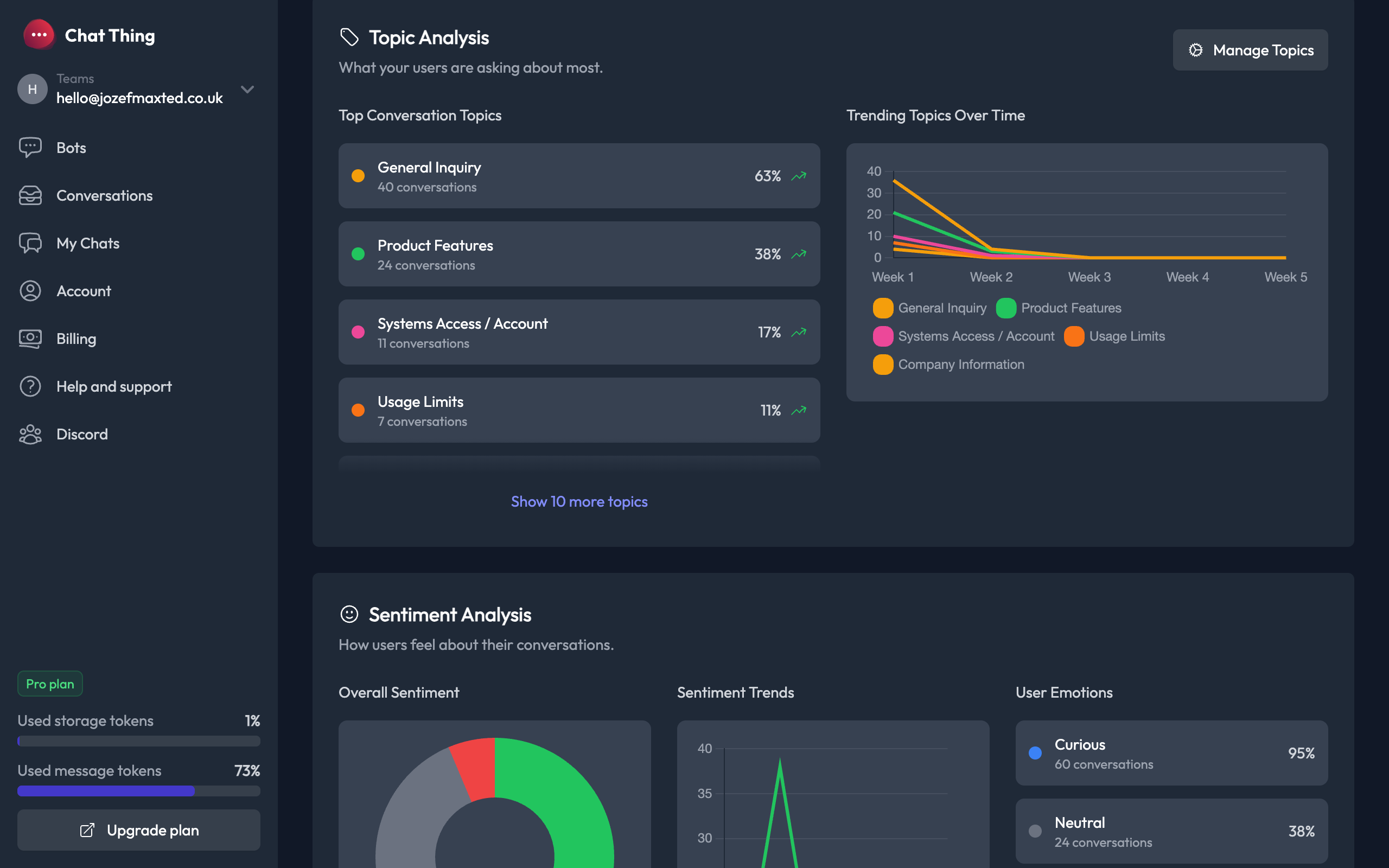
Topic Analysis automatically categorises your conversations into topics, helping you understand what users are asking about most.
What you'll see
- Top Conversation Topics – A ranked list of the most common topics, showing the number of conversations and percentage for each. Click any topic to jump to filtered conversations.
- Trending Topics Over Time – A line chart showing how topic popularity changes week by week.
Managing Topics
Click the Manage Topics button to customise how topics are organised:
- Add topics – Create custom topics relevant to your use case.
- Edit topics – Rename, re-colour, or add descriptions to existing topics.
- Enable/disable topics – Toggle individual topics on or off.
- Auto-generate – Let the AI automatically discover and create topics from your conversations.
Topics are limited to a maximum of 10 per bot. Each topic has a colour for easy identification in charts and conversation lists.
Sentiment Analysis
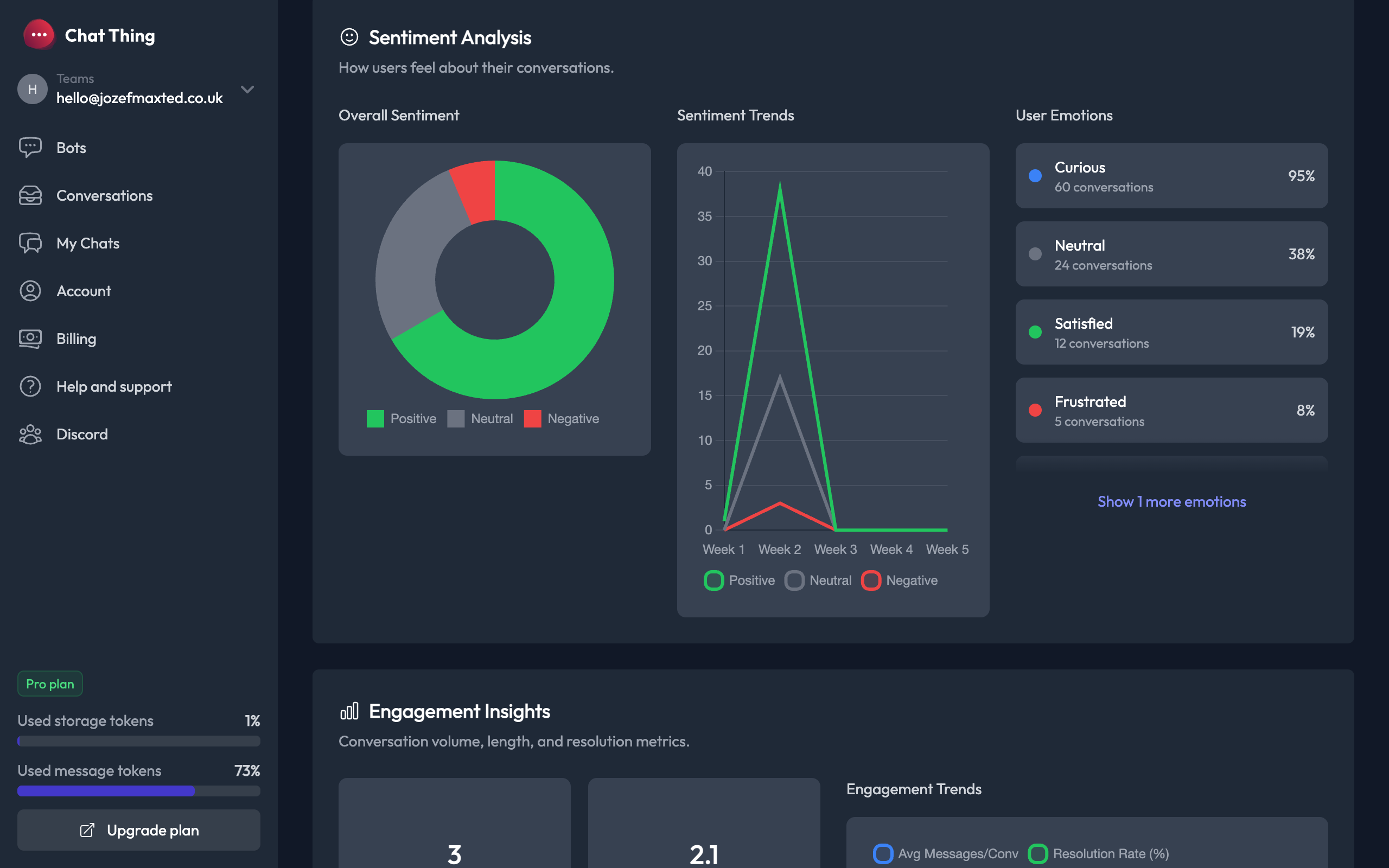
Sentiment Analysis tracks how users feel during their conversations, giving you an at-a-glance view of user satisfaction.
What you'll see
- Overall Sentiment – A donut chart breaking down conversations into Positive, Neutral, and Negative sentiment.
- Sentiment Trends – A line chart showing how sentiment shifts over time, helping you spot issues early.
- User Emotions – A detailed breakdown of specific emotions detected in conversations, such as Curious, Satisfied, Frustrated, Confused, and more. Each emotion shows the number of conversations and its percentage.
Engagement Insights
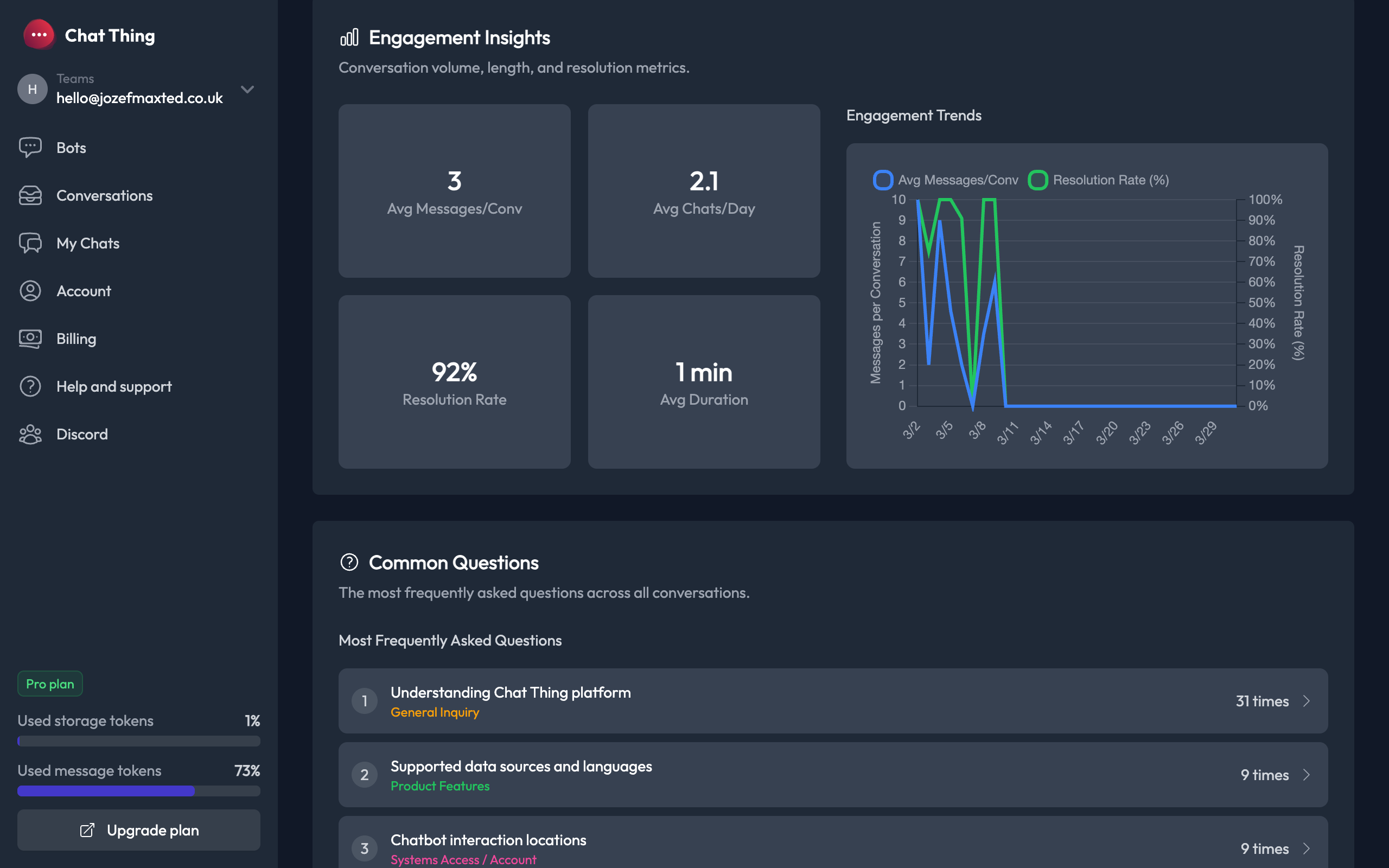
Engagement Insights provides key metrics about how users interact with your bot, helping you understand conversation quality and volume.
Key metrics
- Avg Messages/Conv – The average number of messages exchanged per conversation.
- Avg Chats/Day – How many conversations happen on an average day.
- Resolution Rate – The percentage of conversations that were resolved successfully.
- Avg Duration – The average active time spent in a conversation.
Engagement Trends
The trend chart shows two metrics over time:
- Avg Messages/Conv (blue line) – Tracks whether conversations are getting longer or shorter.
- Resolution Rate % (green line) – Tracks whether your bot is successfully resolving user queries.
Common Questions
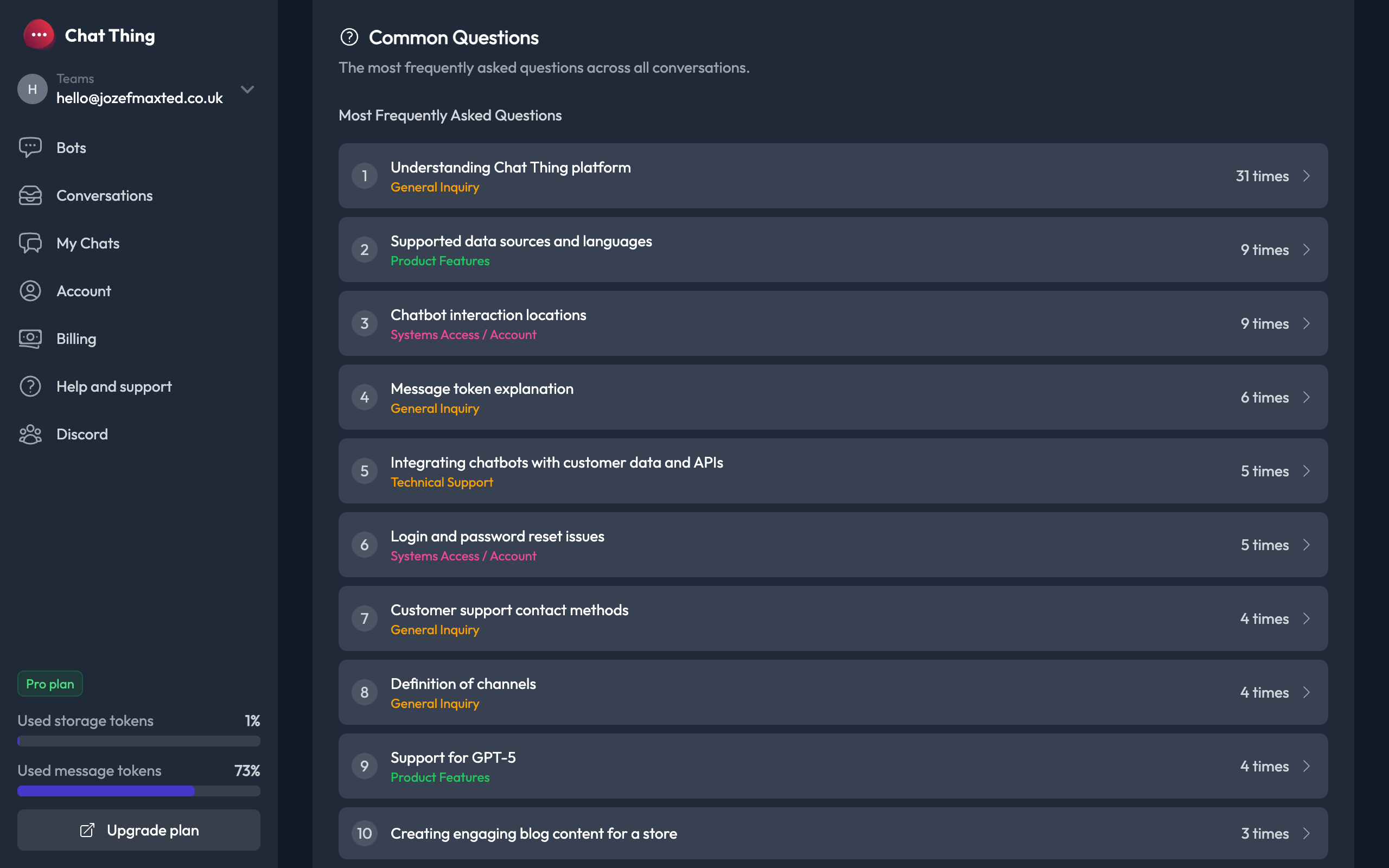
Common Questions uses AI to cluster similar user messages and identify the most frequently asked questions across all conversations.
What you'll see
- A ranked list of the top 10 most frequently asked questions.
- Each question shows the associated topic (colour-coded) and how many times it was asked.
- Click the arrow on any question to expand it and see the individual conversations where it was asked.
How to use this
Common Questions is one of the most actionable analytics features. Use it to:
- Identify knowledge gaps – If users keep asking the same thing, consider adding a data source or updating your bot's prompt to better handle that topic.
- Improve your FAQ – Use the most common questions to build or update your product's FAQ or help docs.
- Spot trends – New questions appearing frequently may indicate a product issue or a new user need.
Actionable Recommendations
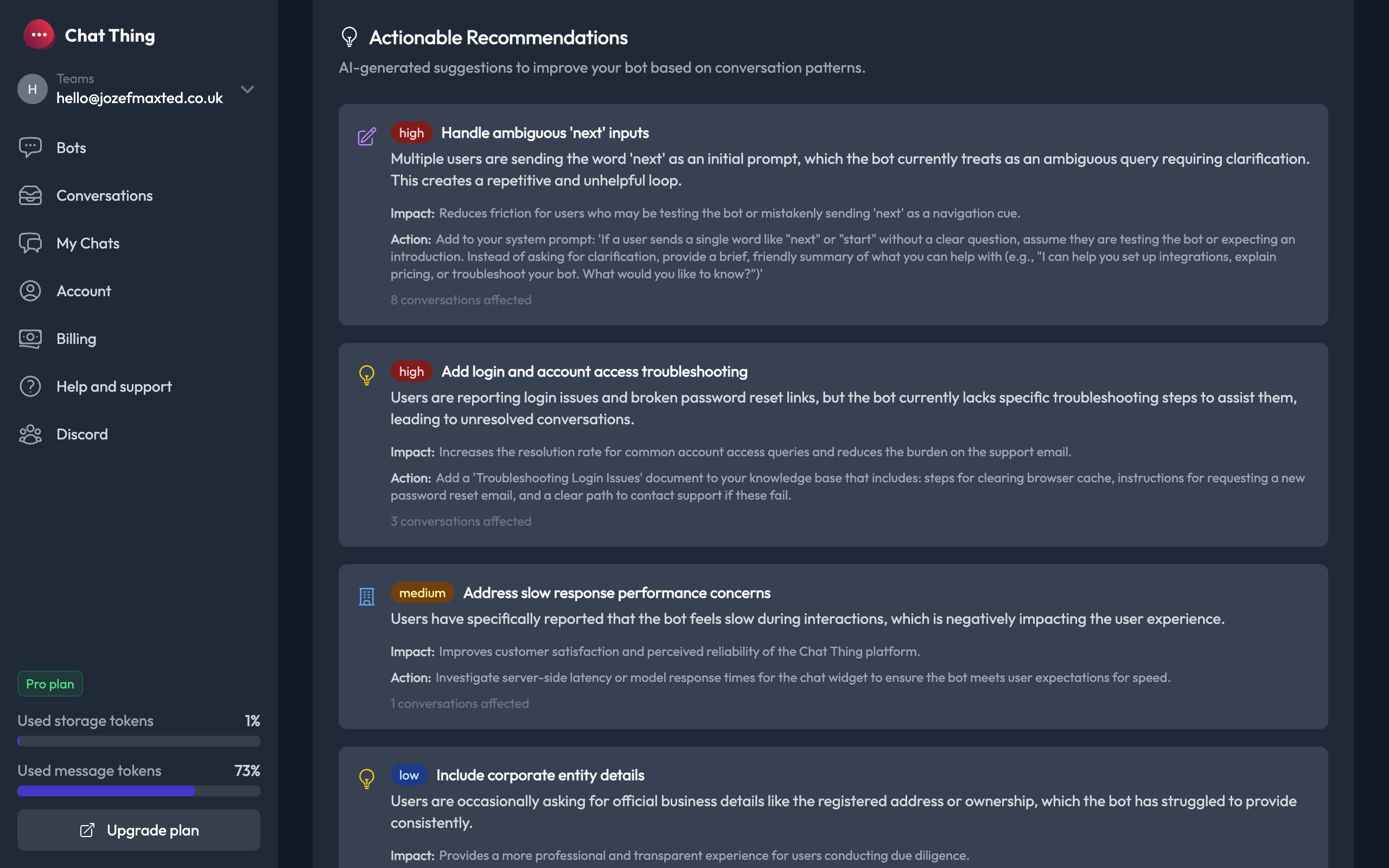
Actionable Recommendations uses AI to analyse your conversation patterns and generate specific, prioritised suggestions to improve your bot.
Recommendation types
Each recommendation is categorised by type:
- Prompt Update – Suggests changes to your bot's system prompt to handle specific scenarios better.
- Knowledge Gap – Identifies topics where your bot lacks information and suggests adding new data sources.
- Business Insight – Highlights strategic insights about how users are interacting with your bot.
- Feature Suggestion – Suggests new features or integrations that could improve the user experience.
- Success – Highlights things your bot is doing well, so you know what to keep.
Priority levels
Recommendations are ranked by priority:
- High (red) – Issues affecting many users or causing significant friction.
- Medium (orange) – Improvements that would noticeably enhance the experience.
- Low (blue) – Minor enhancements or nice-to-haves.
- Info (grey) – Positive observations about what's working well.
What each recommendation includes
Every recommendation provides:
- Description – A clear explanation of the issue or opportunity.
- Impact – Why this matters and how it affects users.
- Action – A specific, concrete step you can take to address it.
- Conversations affected – How many conversations relate to this recommendation.
Weekly Analytics Reports
If you have analytics enabled, Chat Thing will send you a weekly email report summarising your bot's performance. The report includes:
- Key engagement metrics for the week
- Sentiment overview
- Top common questions
- AI-generated insights and recommendations
- Direct links to your dashboard and conversations
You can manage your email preferences from your Account settings page.